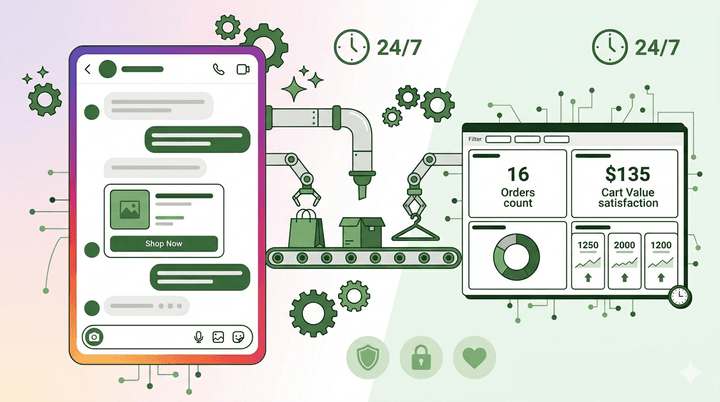
Instagram isn’t just a platform for brand awareness anymore. It’s a full-fledged sales channel. With over 2 billion monthly active users and features like Shopping, Reels, and Stories, Instagram drives more e-commerce discovery than almost any other platform. But here is the challenge: when customers discover your products through a Reel or a Story, they don’t visit your website. They send you a DM.
For small and mid-sized e-commerce businesses, this creates a bottleneck. You are getting dozens or hundreds of DMs asking about product availability, sizes, pricing, and shipping, and every unanswered DM is a lost sale. Instagram DM automation solves this by instantly responding to every message, guiding customers through your catalog, and converting conversations into orders around the clock.
The Instagram DM Opportunity for E-Commerce
The numbers tell a compelling story. According to Meta, over 150 million people message a business on Instagram every month. For e-commerce brands, DMs have become a primary customer interaction channel — often surpassing email and website chat for product discovery and purchase inquiries.
Why? Because the buying behavior on Instagram is impulse-driven and conversational. A customer sees a product in a Reel, taps through to your profile, and instead of navigating to a website, they message you directly: “Is this available in blue?” or “How much is shipping to Bangalore?” If that message goes unanswered for even an hour, the impulse fades and the sale is lost.
The brands that are winning on Instagram are the ones that treat DMs as their storefront. And automation is what makes that scalable.
What Instagram DM Automation Can Do
Auto-Reply to Story Mentions and Reactions
When someone replies to your Instagram Story, whether it is a reaction emoji or a question about a product you featured, the automation can instantly send a relevant response. For example, if you post a Story showcasing a new product and someone replies with “How much?”, the bot can automatically respond with the price, available variants, and a link to purchase.
This is particularly powerful during product launches and flash sales. You can post a Story with “DM us ‘SALE’ for the exclusive link” and the automation handles every incoming message instantly, even if thousands of people respond at once.
Interactive Product Catalog
Instead of just answering questions, your DM automation can proactively guide customers through your product range. When someone messages you, the bot can ask what category they are interested in, show relevant products with images and prices, and let them browse your catalog entirely within the DM conversation.
This conversational shopping experience feels more personal than browsing a website. Customers can ask questions about specific products, compare options, and get recommendations based on their preferences, all in real-time within the chat.
Order Tracking and Support
Post-purchase support is just as important as pre-purchase engagement. Customers who have placed an order often message with questions about shipping status, delivery timeline, or return procedures. Automation handles these queries by pulling order information and providing instant updates. Instead of “Let me check and get back to you,” the customer gets “Your order #1234 shipped on April 2 and is expected to arrive by April 5. Here is your tracking link.”
Step-by-Step: Setting Up Instagram DM Automation
Step 1: Switch to an Instagram Business or Creator Account
DM automation requires a professional Instagram account connected to a Facebook Page. If you are still on a personal account, switch to a Business account through your Instagram settings. This also unlocks analytics, Shopping features, and the ability to connect with automation platforms through the Instagram Messaging API.
Step 2: Connect to an Automation Platform
Choose a platform that supports the Instagram Messaging API and offers both flow-based and AI-powered automation. The platform should let you build conversation flows visually, without coding, and support features like quick replies, carousels, and media messages. Platforms like Inceptimind connect to your Instagram account in minutes and provide a unified dashboard for managing Instagram alongside WhatsApp and Facebook.
Step 3: Build Your Core Flows
Start with the flows that will have the biggest impact: product inquiries, order status checks, and frequently asked questions. Use your no-code flow builder to design the conversation paths. Each flow should feel natural and conversational, not like filling out a form.
Step 4: Set Up Keyword Triggers
Define keywords that trigger specific automation flows. Common examples: “price” triggers the product catalog, “track” triggers order tracking, “return” triggers the returns process, and “help” connects to a human agent. Also set up Story reply triggers for specific campaigns.
Step 5: Upload Your Knowledge Base
For questions that fall outside your predefined flows, an AI knowledge base ensures customers still get helpful answers. Upload your product details, shipping policies, return policies, sizing guides, and FAQs. The AI will use this information to answer open-ended questions naturally, something a basic rule-based bot simply cannot do.
Step 6: Test, Launch, and Optimize
Test every flow by sending yourself DMs from a personal account. Check that the responses are accurate, the tone matches your brand, and the handoff to human agents works when needed. After launch, review analytics weekly to identify drop-off points and refine your flows.
Ready to turn your Instagram DMs into a sales machine?
Inceptimind lets you automate Instagram, WhatsApp, and Facebook messages from one dashboard. No coding required. Plans start at ₹399/mo.
Get Started Today7 Automation Flows Every E-Commerce Store Needs
1. Welcome Flow
When a new customer messages you for the first time, make a great impression. The welcome flow introduces your brand, asks what they are looking for, and routes them to the right path: browsing products, checking an order, or getting help. Keep it warm and concise. Something like: “Hey! Welcome to [Brand Name]. I can help you browse our collection, track an order, or answer any questions. What would you like to do?“
2. Product Discovery Flow
Guide customers through your catalog by category. Start broad (“Are you looking for men’s, women’s, or accessories?”) and narrow down based on their responses. Show products with images, prices, and quick-reply buttons to add to cart or learn more. This flow should feel like chatting with a knowledgeable shop assistant, not scrolling through a database.
3. Size and Fit Guide Flow
For fashion and apparel brands, sizing questions are among the most common DMs. Automate this with a flow that asks the customer’s usual size in popular brands and recommends your equivalent. Include a size chart image and offer to connect them with a human stylist for personalized advice. This reduces returns and increases purchase confidence.
4. Flash Sale and Launch Flow
Create keyword-triggered flows for campaigns. Post a Reel or Story with “DM us ‘LAUNCH’ to get early access” and the automation instantly sends the product link and discount code. This creates urgency, drives engagement, and gives you a direct line to your most interested customers. It also boosts your Instagram algorithm ranking because DM conversations signal high engagement.
5. Abandoned Cart Recovery Flow
If your store tracks abandoned carts and you have the customer’s Instagram handle, you can send a friendly reminder through DMs. “Hey [Name], we noticed you left some items in your cart. Still interested? Here is a 10% discount to help you decide.” This works particularly well on Instagram because the message feels personal rather than transactional, unlike a standard abandoned cart email.
6. Order Status and Tracking Flow
Let customers check their order status by providing their order number or the email they used at checkout. The bot pulls the status and shares it instantly: order confirmed, packed, shipped, out for delivery, or delivered. Include the tracking link and estimated delivery date. This single flow can eliminate 30-40% of your support volume.
7. Returns and Exchange Flow
Automate the returns process by guiding customers through your return policy, checking eligibility based on the purchase date, and initiating the return if they qualify. The bot collects the reason for return, sends a return shipping label or pickup schedule, and confirms the process. This turns a potentially frustrating experience into a smooth, brand-positive interaction.
Instagram + WhatsApp: The Multi-Channel Strategy
The most effective e-commerce messaging strategy does not rely on a single channel. Instagram is where customers discover your products, but WhatsApp is where deeper relationships are built. A smart multi-channel approach uses both platforms together:
- Discovery on Instagram: Customers find your products through Reels, Stories, and the Explore page. DM automation handles initial inquiries, shares product details, and captures interest.
- Conversion on WhatsApp: For customers who are ready to buy or need more detailed support, transition the conversation to WhatsApp. Send the customer a WhatsApp link from the Instagram DM. WhatsApp supports richer interactions, including catalogs, payment links, and order notifications. Our complete guide to WhatsApp automation for business covers the setup in detail.
- Retention on WhatsApp: Once a customer has purchased, WhatsApp becomes your retention channel. Send order updates, delivery notifications, review requests, and personalized recommendations for repeat purchases.
- Re-engagement on Instagram: Use Instagram Stories and Reels to showcase new products, and encourage existing customers to re-engage through DMs for exclusive offers.
The key to making this work is managing both channels from a single platform. Jumping between separate Instagram and WhatsApp tools creates fragmented customer profiles and disjointed experiences. A unified messaging platform lets you see the complete customer journey across channels and deliver consistent, personalized interactions.
How Inceptimind Helps
Inceptimind is designed for exactly this kind of multi-channel automation. From a single dashboard, you can build and manage chatbots for Instagram, WhatsApp, and Facebook. The platform offers:
- Visual flow builder: Design conversation flows with drag-and-drop simplicity. No coding, no technical setup. Build your product discovery flow, order tracking, and returns process in minutes.
- AI-powered knowledge base: Upload your product catalog, FAQs, and policies. The AI handles questions that do not fit neatly into predefined flows, providing accurate, contextual responses that feel human.
- Multi-channel management: Connect Instagram, WhatsApp, and Facebook to one platform. Customer conversations are unified, so if someone starts on Instagram and continues on WhatsApp, you have the full context.
- Smart analytics: Track which products are most asked about, where customers drop off, and how automation is affecting your conversion rates. Use these insights to continuously refine your flows and content.
With plans starting at ₹399/month, Inceptimind makes Instagram DM automation accessible for e-commerce businesses of every size, from small Shopify stores to established D2C brands. For a detailed breakdown of messaging costs, see our WhatsApp API pricing guide for India.
Instagram DM automation is not about replacing human interaction. It is about making sure every customer gets an instant, helpful response, whether you are awake or asleep, whether ten people are messaging or ten thousand. The stores that automate their DMs today will be the ones that dominate Instagram commerce tomorrow.